 WeSimGlide
OpenXR · MSFS 2024 & other VR games
Development preview
A different setup.
For every game.
Choose your frame-generation mod and settings per game. WSG OpenXR FG Switcher remembers them for you. Pick your game, apply its saved setup, and play.
Download preview for Windows ↓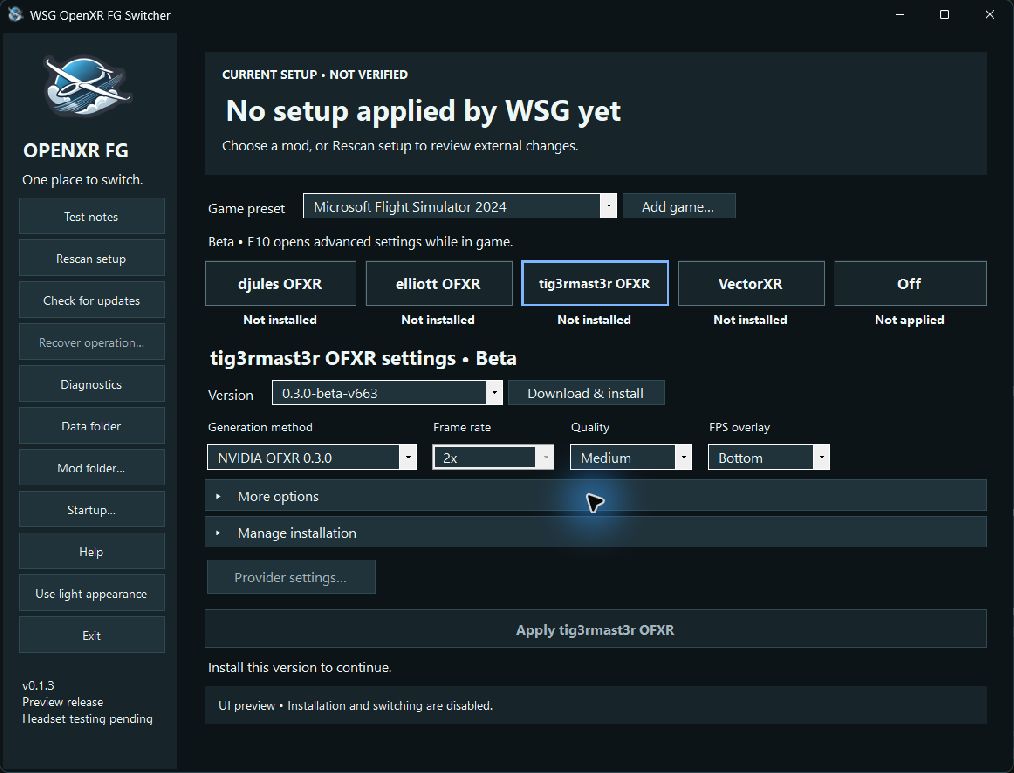
Development preview. Headset testing is still pending. Results may vary with your game and VR equipment.
Four mods. Plus an Off switch.
Try a different mod for each game, or compare them in the same game.
One setup is active at a time. Close your games before applying changes, then launch again.
Choose. Apply. Play.
Open the app
Extract the full download to a folder outside your game, then open WSG OpenXR FG Switcher.exe. Keep the included files together.
Choose your game & mod
Select your Game preset, or choose Add game…. Pick a mod, then use Download & install if needed.
Apply your setup
With games closed, adjust your settings and click Apply. Wait for Ready for next launch, then start your game as usual.
More help with installation
Windows x64 and .NET 10 Desktop Runtime (x64) are required. If Windows asks for .NET, use the download link above and choose the Desktop Runtime. Extract the ZIP into a writable folder; do not run the app from inside the ZIP.
MSFS 2024 is detected automatically. For another game, use Add game… and select its executable. Use Mod folder… to choose where WSG installs managed mods.
For VectorXR, complete its official installer and any Windows administrator prompt. Close the VectorXR editor before applying changes in WSG. If an installation is interrupted, follow the app’s recovery instructions.
Keep what works for you.
A setup for each game
Prefer djules OFXR in MSFS and VectorXR in another game? Save a mod, version and settings for each, then apply that game’s preset next time.
See what you’ve applied
Green and Applied identify your current setup. Explore another tab and adjust its settings whenever you like; changes wait until you apply them.
Keep track of your tests
Use Test notes to record what felt smoother or looked better. Add your FPS figures if you want, and export your notes to compare later.
Remove what you no longer use
Open Manage installation to remove a mod. Use Clean stored files… to clear old downloads and other unused files.
Your favourite setup, ready at startup.
Choose how WSG opens in Startup….
Remember your usual setup
Choose your default game and mod, then enable Apply this preset when WSG starts. Open WSG before your game and let it prepare your saved setup.
Keep the window out of the way
Enable Start in tray to open WSG as a small icon beside the Windows clock. Use that icon to bring the window back whenever you need it.
Routine checks pause while WSG is tucked away during your flight.
For custom launch scripts
If you already use a script to start your flight tools, WSG can fit into it. Close any existing WSG instance using Exit before running an apply command.
"WSG OpenXR FG Switcher.exe" --apply-defaultThis applies your saved default and exits, leaving the selected mod ready. If setup fails, WSG opens visibly with the error, even when Start in tray is enabled. Fix the issue, close that window, and retry your launcher. Have your script wait for a successful result (exit code 0) before starting the game. The included README has a complete PowerShell example.
"WSG OpenXR FG Switcher.exe" --trayThis opens WSG in the tray. It applies a setup only if your saved Apply-on-launch option is enabled. The older --minimized and --start-minimized switches still work.
Questions? Find the details here.
How do per-game settings work?
Each WSG game preset remembers the selected mod, version and settings managed by WSG. For example, you can save a different frame rate or quality setting for each game. Selecting a preset does not apply it immediately: close your games and click Apply, or use your saved startup preset.
Only one setup is active at a time. Layer activation is system-wide; tig3rmast3r and VectorXR also use native profiles matched by executable name. Per-game presets do not create simultaneous independent configurations. Restart the game after applying changes; toggling VR mode alone is not enough.
Does this work only with MSFS 2024?
No. You can add another OpenXR game. Actual support and results depend on the chosen mod, runtime, headset and game. Headset testing is still pending for this preview, so compatibility is not guaranteed.
Does “Applied” mean frame generation is running?
Applied and Ready for next launch mean WSG has checked the saved setup. They do not confirm what is running in your headset. Launch the game and use the mod’s own tools to check its operation. The blue outline shows which tab you are editing; green identifies the applied setup.
What does tig3rmast3r OFXR add?
Choose from several frame-generation modes and save the main settings for each game. Each mode remembers its own choices. Its first supported release is 0.3.0 beta (v663).
Use Provider settings… for the desktop editor, or press F10 in game for advanced tuning and benchmarks. Desktop edits change defaults when no game is active; in-game edits belong to that game. WSG preserves advanced options when applying its main controls.
Hybrid, FSR 3.1 and DLSS-G need compatible game inputs; DLSS-G also needs supported NVIDIA hardware. Optional neural-rendering models and the separate Assetto Corsa add-on are not installed by WSG. Results depend on your game, hardware and runtime.
What is new in djules OFXR 0.2.14.3?
WSG 0.1.4 lets you choose 4X for this version: three generated frames per rendered frame. Existing presets keep their settings. HUD fix is available in More options and starts off; try it if translucent HUDs look doubled during turns.
4X needs extra GPU/VRAM headroom and Prefer FPS over latency. R.E.A.L. VR games stay at 2X. For live tuning, use the provider tray; its default Ctrl+Alt+F12 hotkey cycles 2X, 3X and 4X. WSG applies your preset before launch.
Where are the more advanced mod settings?
Expand More options for additional controls supported by the selected version. For full settings, use the OFXR icon’s menu beside the Windows clock, or Start VectorXR app. WSG saves the controls it manages; other provider settings are preserved. Close the VectorXR editor and use Rescan setup after changing settings outside WSG.
Can I use VectorXR’s extra features with OFXR?
Yes, through the explicit option to keep VectorXR’s other features while its frame generation stays off. These combinations remain experimental. WSG normally uses one mod on its own for easier comparisons, and blocks known conflicts and simultaneous managed frame-generation providers.
Checks include supported saved settings for the OpenXR Toolkit / VectorXR turbo-mode conflict. WSG cannot measure every in-game toggle or runtime motion-smoothing setting. Review any compatibility messages and the provider’s documentation.
What do test notes record?
Your observations and any FPS figures you enter, together with the setup’s mod version, settings and OpenXR runtime. Try the same scene with each setup, then save what you noticed. You can export your notes to CSV for a spreadsheet. WSG does not measure performance or run benchmarks automatically.
What do Rescan, updates and recovery do?
Rescan setup checks for changes made outside WSG. Check for updates refreshes the mod list independently of WSG updates; you choose when to download and install new compatible mod versions. WSG app updates are automatic. They install when the app is idle and wait while you are playing or changing a setup.
Recover operation… helps resolve an interrupted switch, installation or removal. It is only available when needed and is not a general reset button. A cancelled or unfinished uninstall is not treated as a completed removal.
What happens when I close the window or choose Exit?
Closing or minimizing the window keeps WSG in the tray and pauses routine checks. Reopening refreshes the setup, and WSG checks again before making changes. An unfinished removal or an explicitly requested Exit may still need checks to finish.
Exit performs provider cleanup once games have closed; it does not silently interrupt a running session. The --apply-default script command instead exits with the selected mod still active, ready for your game. The startup options are independent and both are off by default; WSG never starts your game for you.
What gets removed when I clean stored files?
Completed recovery copies, cached downloads and unused presets for uninstalled, inactive mod versions. Installed mods, current presets and test notes are kept. Unfinished recovery data stays until the operation is resolved.
Use Data folder to open WSG’s files, stored under %LOCALAPPDATA%\WSG OpenXR FG Switcher. Mod removal is a separate action under Manage installation; VectorXR uses its official uninstaller.
Where do the mods come from?
The WSG download contains the switcher; the mods download separately from their official sources and remain unchanged. Downloads are checked against a signed catalog of reviewed versions and file hashes. WSG’s package and update signatures are separate from Windows publisher signing.
What if Windows or antivirus shows a warning?
Keep your protection enabled. If a file is flagged, report the exact warning and download checksum to WeSimGlide.
This development build does not carry an Authenticode publisher certificate. Signed package metadata checks package identity, but does not establish Windows publisher reputation or guarantee antivirus clearance.
Check your download: version and checksum
You can compare your downloaded ZIP’s SHA-256 checksum with the value below to check that the files match.
SHA-256 from the download’s release metadata:
Release information is loading…A matching checksum identifies the ZIP; it is not a safety certification. This page displays the checksum. The application separately verifies signed package metadata and its file inventory.
License and credits
WSG OpenXR FG Switcher is licensed under PolyForm Noncommercial 1.0.0. The included license and notices describe its terms. Upstream mods retain their own licenses and attribution.
More tools for your next flight.
Explore Glass Cockpit Refresh and Stream Feeder, with the same familiar WSG look and feel.